

AlexHales595
Goodlike
- Messages
- 617
- Reaction score
- 899
- Points
- 93
Hello friends, I am your dear friend Alex. I hope you are all well. Once again with a new thread. I hope it is helpful to you.As you know, Windice handles deposits and withdrawals for each cryptocurrency via separate links. XRP is one such currency that many people avoid using for these transactions—often out of fear that their funds might be lost. However, there are specific conditions that must be met to deposit or withdraw XRP, and these requirements are not as difficult as people imagine. Let me explain how to deposit funds into Windice or withdraw them from the platform.
How to Deposit in Windice from wallet
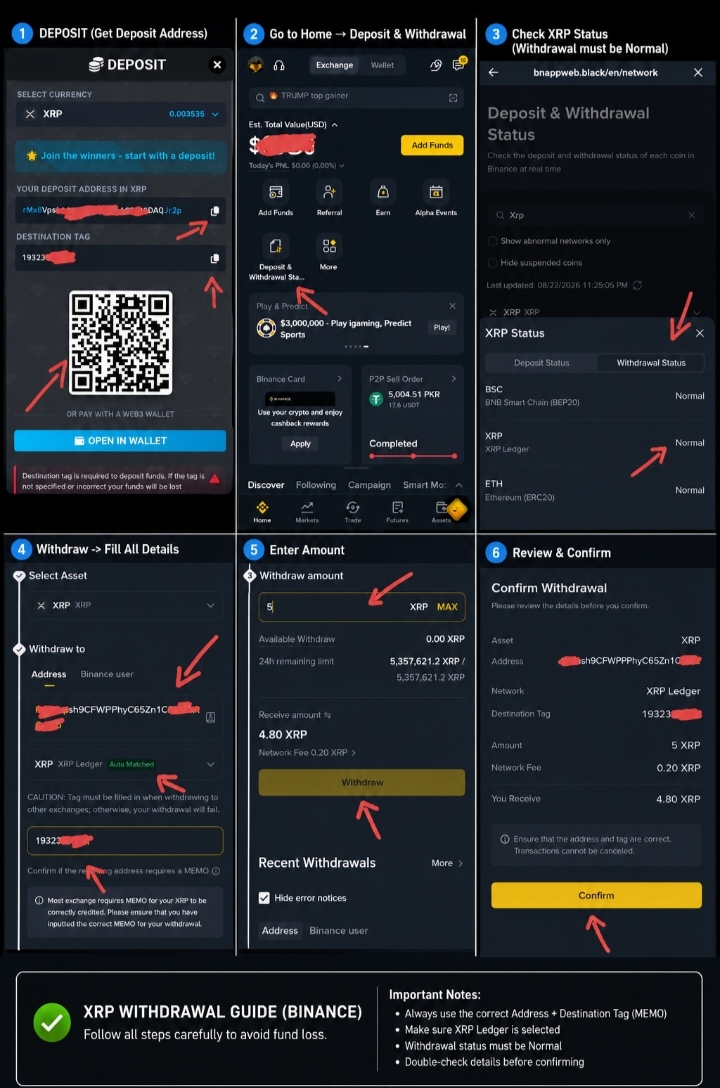
To deposit funds into Windice—as shown in the image—first, go to the deposit sectionin Windice and copy the XRP link. Crucially, you must also copy the "Destination Tag" number; without it, you cannot complete the deposit. After copying both details, open your wallet app (I use Binance, so the screenshots here are from there, but the process is the same for other wallets). To initiate the transfer, select the "Withdraw" option (since you are moving funds *out* of your wallet *into* Windice), search for XRP, and select the XRP Ledger network. Paste the deposit link you copied earlier into the address field. You will see a field labeled "Memo Code"; do not worry—this is simply the "Destination Tag" code you copied earlier.So, come here and paste both the link and the destination tag; it will be selected automatically. After that, scroll down and enter the amount you wish to deposit into Windice. That covers the deposit process; the method for withdrawing from Windice is the same, so I’ll explain that as well.
How to Withdrawal xrp from Windice
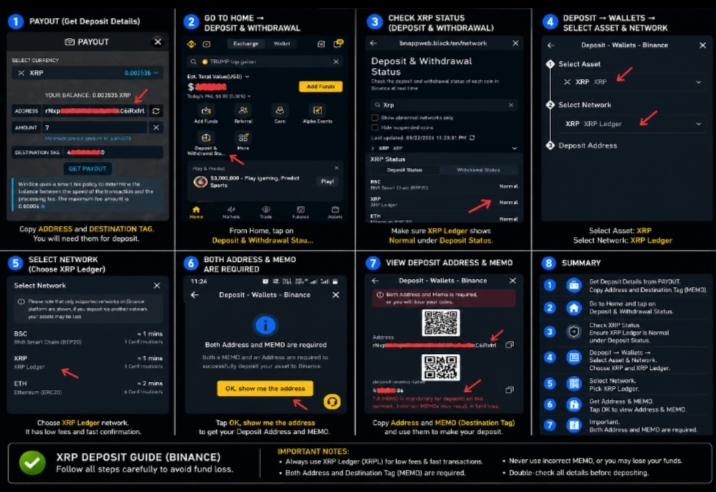
If you wish to withdraw XRP from Windice, you must first go to your wallet and copy both the XRP address and the destination tag (memo code); the withdrawal cannot be processed without the destination tag. Be sure to double-check the address before copying it—I have illustrated this in the image, which should help clarify the process. First, click on the deposit or withdrawal option in Binance and search for XRP. You will then see two options; select "XRP Ledger." After selecting this, the destination tag (memo code) will be displayed. Copy both the address and the destination tag, then go to the "Finance" section in Windice, select the XRP withdrawal option, and paste the address an
destination tag into the respective fields. This will allow your withdrawal to be easily transferred to your wallet.
I hope this proves helpful to those who are hesitant about making XRP withdrawals. For those who are already knowledgeable on the subject, please do share your thoughts as well. Your friend Alex here—keep smiling and stay happy!
 Wishing you all the best and good luck!

How to Deposit in Windice from wallet
To deposit funds into Windice—as shown in the image—first, go to the deposit sectionin Windice and copy the XRP link. Crucially, you must also copy the "Destination Tag" number; without it, you cannot complete the deposit. After copying both details, open your wallet app (I use Binance, so the screenshots here are from there, but the process is the same for other wallets). To initiate the transfer, select the "Withdraw" option (since you are moving funds *out* of your wallet *into* Windice), search for XRP, and select the XRP Ledger network. Paste the deposit link you copied earlier into the address field. You will see a field labeled "Memo Code"; do not worry—this is simply the "Destination Tag" code you copied earlier.So, come here and paste both the link and the destination tag; it will be selected automatically. After that, scroll down and enter the amount you wish to deposit into Windice. That covers the deposit process; the method for withdrawing from Windice is the same, so I’ll explain that as well.
How to Withdrawal xrp from Windice
If you wish to withdraw XRP from Windice, you must first go to your wallet and copy both the XRP address and the destination tag (memo code); the withdrawal cannot be processed without the destination tag. Be sure to double-check the address before copying it—I have illustrated this in the image, which should help clarify the process. First, click on the deposit or withdrawal option in Binance and search for XRP. You will then see two options; select "XRP Ledger." After selecting this, the destination tag (memo code) will be displayed. Copy both the address and the destination tag, then go to the "Finance" section in Windice, select the XRP withdrawal option, and paste the address an
destination tag into the respective fields. This will allow your withdrawal to be easily transferred to your wallet.
I hope this proves helpful to those who are hesitant about making XRP withdrawals. For those who are already knowledgeable on the subject, please do share your thoughts as well. Your friend Alex here—keep smiling and stay happy!
Wishing you all the best and good luck!